Scope
Event name, dates, expected attendees, and expected resume submissions establish the real demand signal.
Operations
Blacklight is built for organizations that need resume support to stay consistent across locations, staff roles, and reporting needs instead of living in scattered one-off handoffs.
The partner program is strongest when intake, access, reporting, billing, and trust stay visible in one accountable program view, not split across inboxes, spreadsheets, and local workarounds.
Control and visibility
The participant experience, support model, and reporting story all drift when each location handles the program differently. Blacklight keeps those seams visible enough to govern.
Intake discipline
Hosted intake and embeds keep the program on one front door, even when different branches or teams need different operational handling behind it.
Support boundaries
A partner program stays governable when support routing is explicit instead of improvised through inboxes and local staff workarounds.
Leadership oversight
The people reviewing adoption, billing, and launch readiness should not have to reconstruct the program from separate tools, exports, and email threads.
Reporting proof
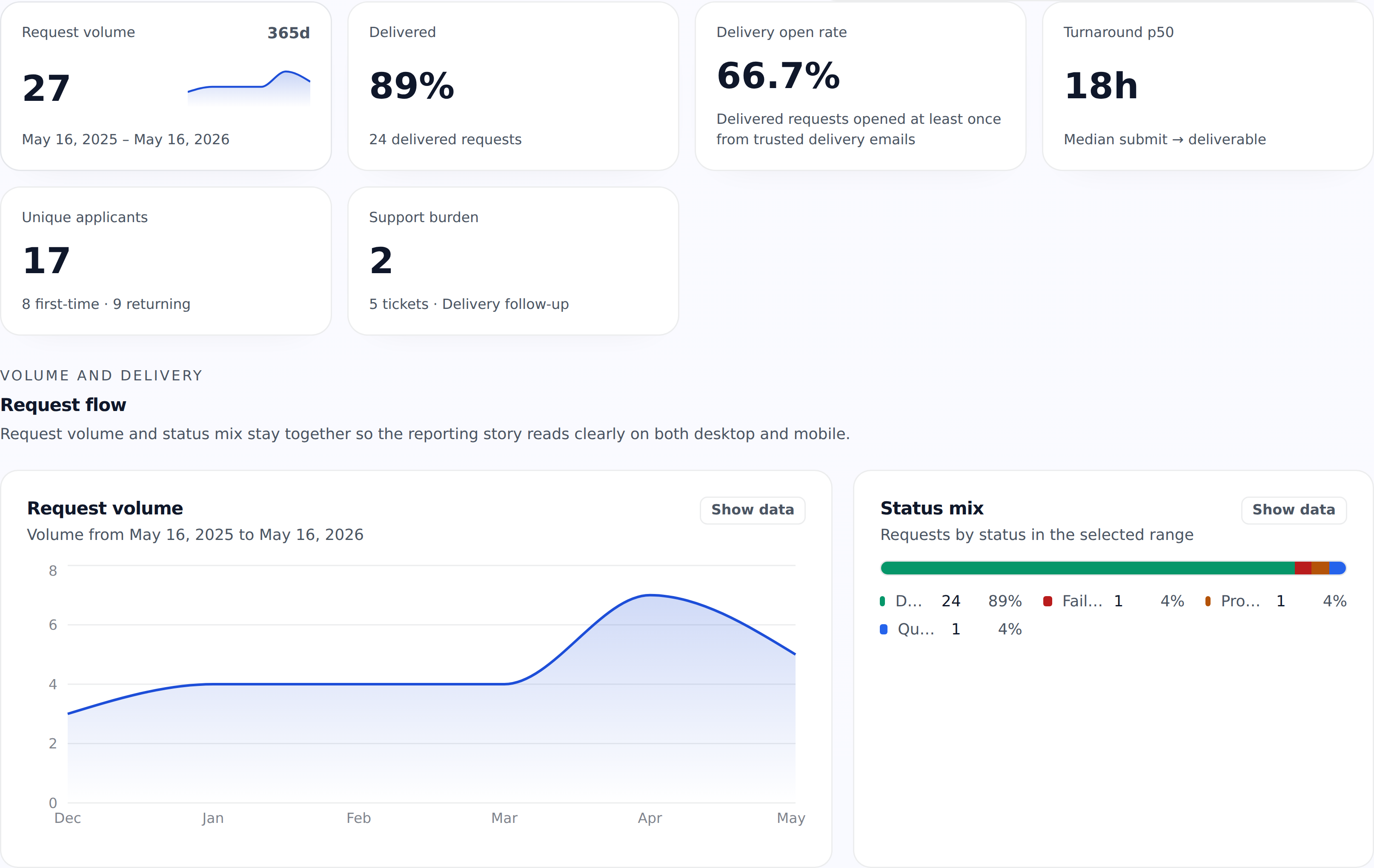
This is the strongest current proof on the route: a real partner reporting workspace, captured from a demo-safe Metroworks account with request flow, delivery state, support burden, and location contrast in one maintained view.
What the reporting proof demonstrates
Program flow
Start with the request-flow summary to see submitted volume, delivered work, turnaround, delivery opens, and support burden in one read.
Seeded partner proof
The Metroworks proof account now carries demo-safe activity across 27 requests, 24 delivered packages, and 17 unique applicants for public capture.
Location comparison
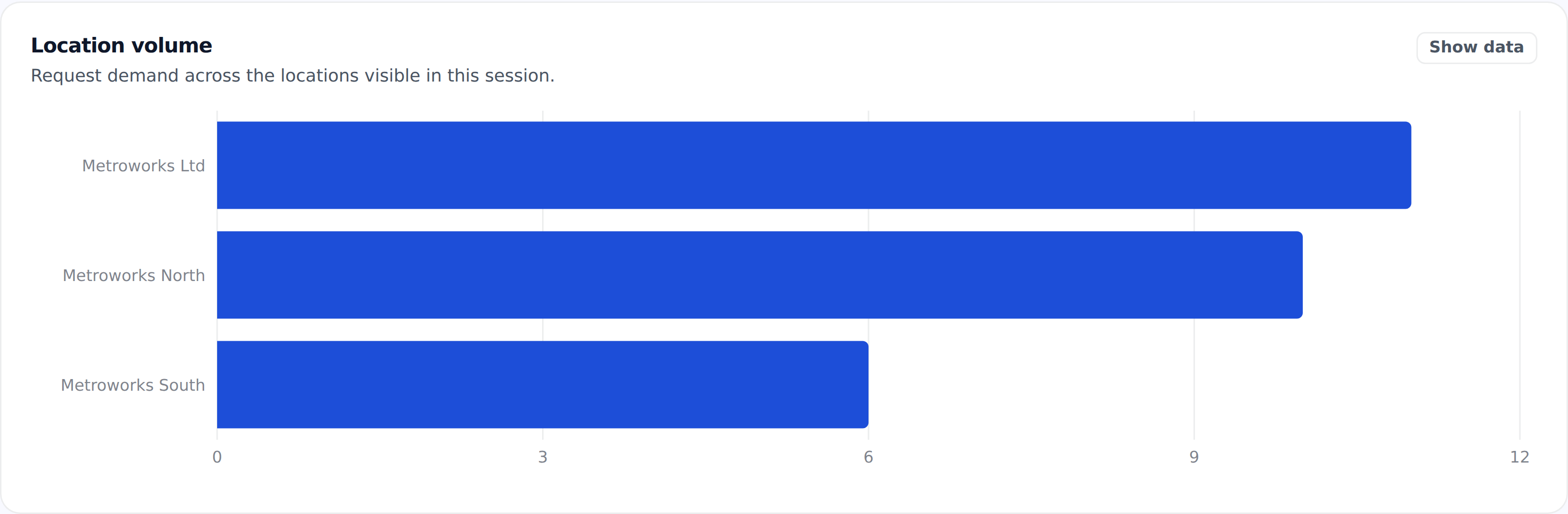
Location volume separates Metroworks Ltd, North, and South so distributed demand does not collapse into one account-wide read.
Control surfaces
These are the areas where a distributed partner program usually breaks down first if the product is not designed for system-level control.
Location-aware rollout
Keep hosted intake, support routing, and partner activity organized by branch, campus, or site instead of one undifferentiated queue.
Scoped staff access
Give staff the access they need by role and location instead of sharing one partner login across the whole organization.
Capacity and rate controls
Monthly service levels and daily request controls stay attached to the account structure instead of being managed manually.
Reporting and exports
Track people served, request activity, and delivery volume with partner-facing exports that make system oversight easier.
Special events and sponsored programs
Job fairs, sponsored resume days, workshops, campus events, and other special programs do not behave like normal monthly usage. The review keeps capacity, access, privacy, billing, and written acceptance visible before activation.
Manual review payload
The request form collects the details Blacklight needs to decide whether the setup belongs in a fixed event block, flexible event capacity, a standard partner trial, or a custom rollout conversation.
Scope
Event name, dates, expected attendees, and expected resume submissions establish the real demand signal.
Access
The review confirms whether the event needs an event-day, seven-day, fourteen-day, or custom access window.
Cap
A hard cap or written approval before expansion protects the accepted reserve and not-to-exceed spend.
Commercial model
The quote chooses a prepaid fixed block or flexible capacity with a reservation fee, minimum commitment, and delivered-usage reconciliation.
Privacy mode
Events default to aggregate-only reporting. Operational participant access requires an explicit support need and approved notice; sponsorship alone never grants participant data.
Acceptance
The organizer representative, written acceptance method, acceptance time, and quote or order reference are recorded before participant access is activated.